AI chart analysis tools in 2026: prices and free plans
ChartEdge makes this list, so read it with that in mind. Every tool below gets the same facts: what it reads, what is free and what it costs, taken from its own site on the check date. There are no scores and no "we tested" claims. The order is by type, then alphabetical, not a ranking.
| Tool | Type | Free | Paid | What it reads |
|---|---|---|---|---|
| Bullynx bullynx.com | Screenshot reader | None (no free plan, trial or analysis) | One analysis $9.99 one-time; Monthly $39 (50 analyses a month); Lifetime $149 one-time (50 analyses every month) | Uploaded screenshots; Chrome extension on Monthly and Lifetime |
| ChartEdge AI chartedge.app | Screenshot reader | 3 free analyses, no card | $20 a month, or $180 a year ($15 a month) | Uploaded chart screenshots from any platform; returns trend, levels, entry, stop, targets and risk to reward |
| ChartSnipe chartsnipe.com | Screenshot reader | $0 plan: 2 chart analyses a month, no card | Pro $20 a month or $168 a year (120 credits a month); Premium $50 a month or $420 a year (600 credits a month) | Screenshots from any platform, no broker connection |
| Pineify pineify.app | Screenshot reader | No free chart analysis stated | One-time plans: Plus $99 (2 analyses a day); Advanced and Expert were at sale prices on the check date; the site says lifetime plans are moving to yearly subscriptions | Uploaded candlestick screenshots; the main product is Pine Script generation for TradingView |
| SnapPChart snappchart.app | Screenshot reader | 2 free chart reads (lifetime), no card | Weekly $4.99 (15 grades a week); Monthly $19.99 (100 grades a month); Yearly $199.99 | Uploaded screenshots (PNG, JPG, WebP); grades setups from A+ to F |
| Tickrify tickrify.com | Screenshot reader | See their site | Page title on the check date: $29 a month for 200 AI chart analyses; see their site | Described as AI chart analysis for forex, gold and crypto; details not checked |
| Wick Chrome Web Store | Browser extension | 7 days unlimited, no login, no card | Standard $3 a month (unlimited scans); Pro $15 a month (adds 500 Deep Dive scans a month); credit packs | Charts open in the browser, captured on click; also accepts an uploaded screenshot |
| ChartingLens chartinglens.com | Charting platform | Free forever, no card: 1 AI credit a day (2 on day one), 3 price alerts | Premium $14.99 a month or $149 a year; Pro $29.99 a month or $299 a year | Its own live charts, with one-click chart capture on Premium and Pro; not a screenshot uploader |
| TrendSpider trendspider.com | Charting platform | No free platform tier; 25 free AI chat messages a month on all plans | 4 plans (Standard, Premium, Enhanced, Advanced); a sale was running on the check date, see their site | Full charting platform with its own data, scanners and backtesting; not a screenshot reader |
| ChatGPT chatgpt.com | General AI assistant | Free plan includes limited image upload | See their site | Any uploaded image; a general assistant, not built around a fixed trade plan |
Prices checked on each tool's own site on 10 November 2026. They change; check the site before you buy.
What you get from one screenshot
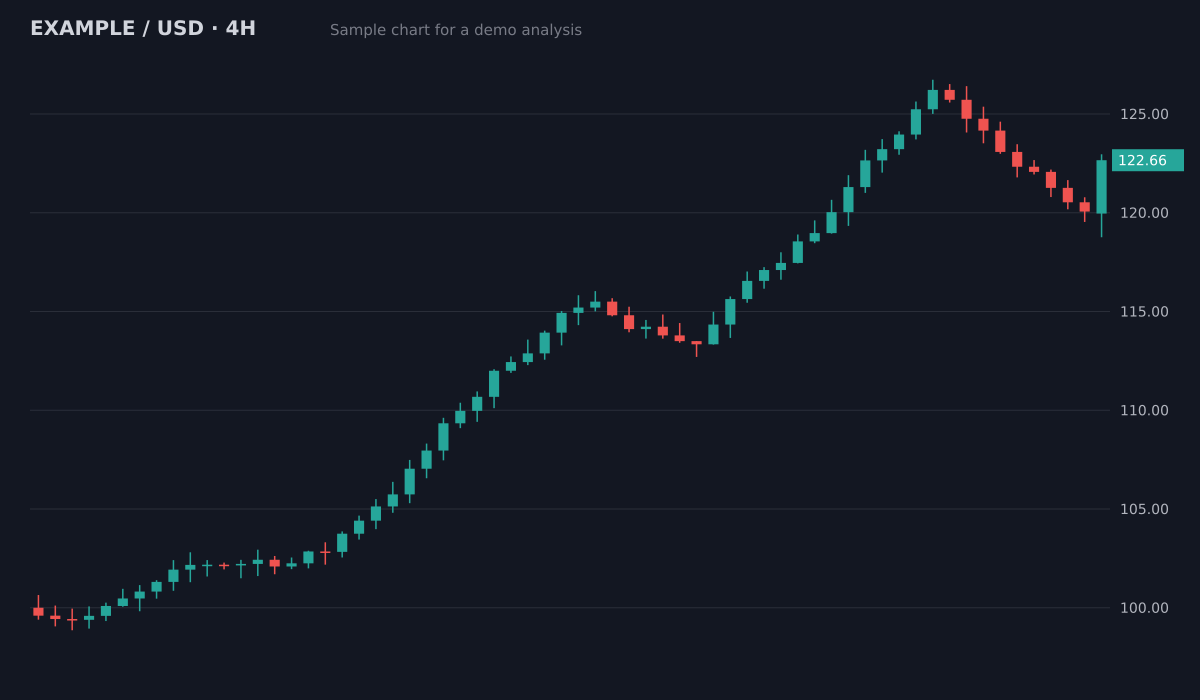
- Bias
- Bullish, pullback in an uptrend
- Structure
- Higher highs and higher lows since 100; pullback held above the 119.5 breakout area
- Key levels
- Resistance126.5 (swing high)
- Support119.5 to 120 (old breakout)
- Support113.5 to 115 (prior range)
- Plan
- Entry zone120.5 to 121.5
- Stop loss118.4
- Target 1126.5 (1:2.1)
- Target 2129.5 (1:3.3)
Invalid if a 4H candle closes below the 119.5 support. Size the position from the stop distance.
Sample chart with illustrative prices, not a live market. Educational, not financial advice.
Try it on your own chartScreenshot readers
You upload a picture of any chart and get a written reading. They work with any broker or platform because they only need the image.
Browser and charting platforms
They read charts drawn inside their own app or your browser, often with live data, scanners or alerts. You chart there instead of uploading.
General AI assistants
A chatbot that reads any image. Flexible, but the answer depends on your prompt and is not built around a fixed trade plan.
Try it on your chart now
No account needed. Upload a screenshot and see the bias and key levels in seconds.
How this list was made
Each fact was copied from the tool's own website or store listing on the date shown under the table. Where a price did not load or was a temporary sale, the table says "see their site" instead of guessing. Prices change often, so check the site before you buy. If a tool you use is missing or a fact is out of date, write to support@chartedge.app and we will check it.
Which type suits you
If you trade on a phone app or a broker platform and want a plan for one chart at a time, a screenshot reader is the simplest. If you want live data, scanners and backtesting in one place, a charting platform fits better, at a higher price. If you only need an occasional description of a chart, a general AI assistant may be enough. Whatever you choose, test it on an old chart where you already know what happened next.
ChartEdge AI
A screenshot reader. Upload a chart from any platform (TradingView, MetaTrader, a broker app, an exchange) and get the trend, the key levels, an entry zone, a stop, targets and the risk to reward in the same format every time. 3 analyses are free with no card, then $20 a month or $180 a year. Educational analysis, not financial advice.
Free options at a glance
From the table: ChartEdge gives 3 free analyses, ChartSnipe 2 a month, SnapPChart 2 in total, ChartingLens 1 AI credit a day on its own charts, Wick 7 days unlimited, and ChatGPT's free plan includes limited image upload. Bullynx has no free plan, and TrendSpider has no free platform tier.
What to check before you pay
A useful plan has an invalidation level, not only targets; the prices must match the axis on your chart; and no tool can promise a win rate or profits. Our guide on how to choose an AI chart analysis tool lists 6 checks, and the guide on using AI for trading safely gives a checklist before you follow any plan.
Questions
What is the best AI tool for chart analysis?
It depends on how you trade. For a written plan from a screenshot of any platform, a screenshot reader such as ChartEdge is built for that. For live data and scanners, a charting platform fits better. Test any tool on an old chart before you rely on it.
Is there a free AI chart analysis tool?
Several have a free allowance: ChartEdge (3 analyses, no card), ChartSnipe (2 a month), SnapPChart (2 in total), ChartingLens (1 credit a day on its own charts) and Wick (7 days). Limits change, so check each site.
Why is ChartEdge on its own list?
Because it is one of the tools in this category. We say so at the top, give it the same facts as every other tool and do not rank or score anything.
Can an AI chart tool predict the market?
No. These tools read the structure on the chart faster than you can, but nobody knows future prices. Use the output as a second opinion with a stop on every trade. Educational content, not financial advice.
How often are these prices checked?
About once a month. The check date is under the table; if it is old, trust the tool's own site.
Try it on your next chart
Upload a screenshot and get a full trade plan in seconds.
3 free analyses. No card required.
Try 3 free analyses, no card
Try free