AI analysis for your Binance charts
Take a screenshot of the chart in the Binance app or on the Binance website, spot or futures, upload it, and get a structured read of the trend, the key levels and a full trade plan with entry, stop loss and targets. No API key and no exchange login: ChartEdge AI only reads the picture.
What you get from one screenshot
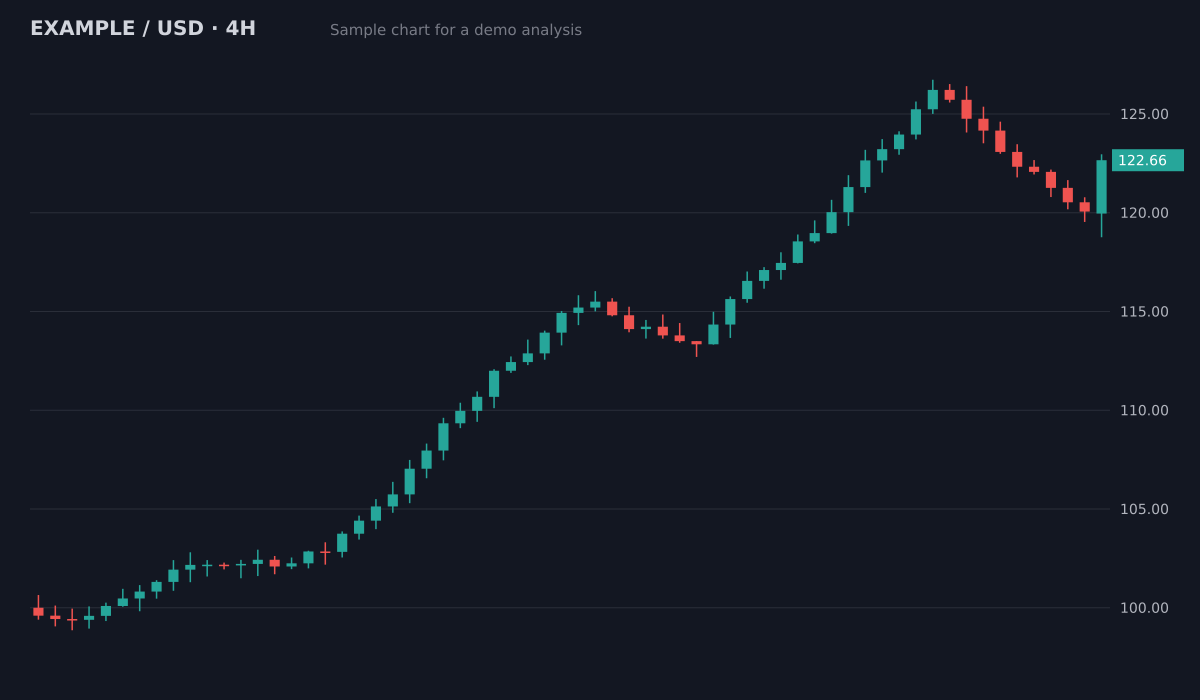
- Bias
- Bullish, pullback in an uptrend
- Structure
- Higher highs and higher lows since 100; pullback held above the 119.5 breakout area
- Key levels
- Resistance126.5 (swing high)
- Support119.5 to 120 (old breakout)
- Support113.5 to 115 (prior range)
- Plan
- Entry zone120.5 to 121.5
- Stop loss118.4
- Target 1126.5 (1:2.1)
- Target 2129.5 (1:3.3)
Invalid if a 4H candle closes below the 119.5 support. Size the position from the stop distance.
Sample chart with illustrative prices, not a live market. Educational, not financial advice.
Try it on your own chartScreenshot the Binance chart
In the app or on the website. Keep the pair (for example BTCUSDT), the timeframe and the price scale visible, and close the order panel if it covers the candles.
Upload it
Open ChartEdge AI in your phone or computer browser and drop the image in. Nothing to install and nothing to connect.
Get the plan
Bias, setup, entry zone, stop loss, targets and risk to reward in plain language, saved in your dashboard.
Try it on your chart now
No account needed. Upload a screenshot and see the bias and key levels in seconds.
No API key, no exchange access
ChartEdge AI never asks for a Binance API key, a login or a wallet. It cannot see your balance or place orders. It reads the screenshot and nothing else.
Spot and futures charts
The read is the same on a spot or a perpetual futures chart: trend, levels and a plan. On futures, check the liquidation price for your leverage against the stop with the free liquidation price calculator before you enter.
Reads what you put on the chart
Candles, volume, moving averages, RSI, MACD, Bollinger Bands and lines you drew are taken into account. A clean chart with one or two indicators gives the clearest read.
Questions
Does ChartEdge AI connect to my Binance account?
No. It never asks for your broker login, an API key or a wallet. It only needs a screenshot of the chart, so it cannot see your funds or trade for you.
Does it work with Binance futures charts?
Yes. Upload the perpetual or futures chart like any other. With leverage, make sure the stop loss in the plan sits well before your liquidation price.
Which timeframe should I screenshot on Binance?
The one you plan to trade, with one higher timeframe for direction: for example the 1H for direction and the 15m for the entry. Keep the timeframe label visible so the report can name it.
Can I use it on the Binance phone app?
Yes. Take a normal phone screenshot of the chart, turn the phone sideways for a wider view if you can, and upload it from your phone browser.
Is ChartEdge AI part of Binance?
No. ChartEdge AI is an independent tool and is not affiliated with Binance. It reads chart screenshots from any exchange or broker.
Is there a free trial?
Yes. Your first 3 analyses are free with no card required. Then it is $20 per month. Educational analysis, not financial advice.
Try it on your next chart
Upload a screenshot and get a full trade plan in seconds.
3 free analyses. No card required.
Get a plan for your Binance chart
Try free