How to choose an AI chart analysis tool
There are general chatbots that read images, charting platforms with AI features, and dedicated screenshot analyzers like ChartEdge AI. Whichever you try, these checks tell you whether its output helps a real decision or is just confident text.
What you get from one screenshot
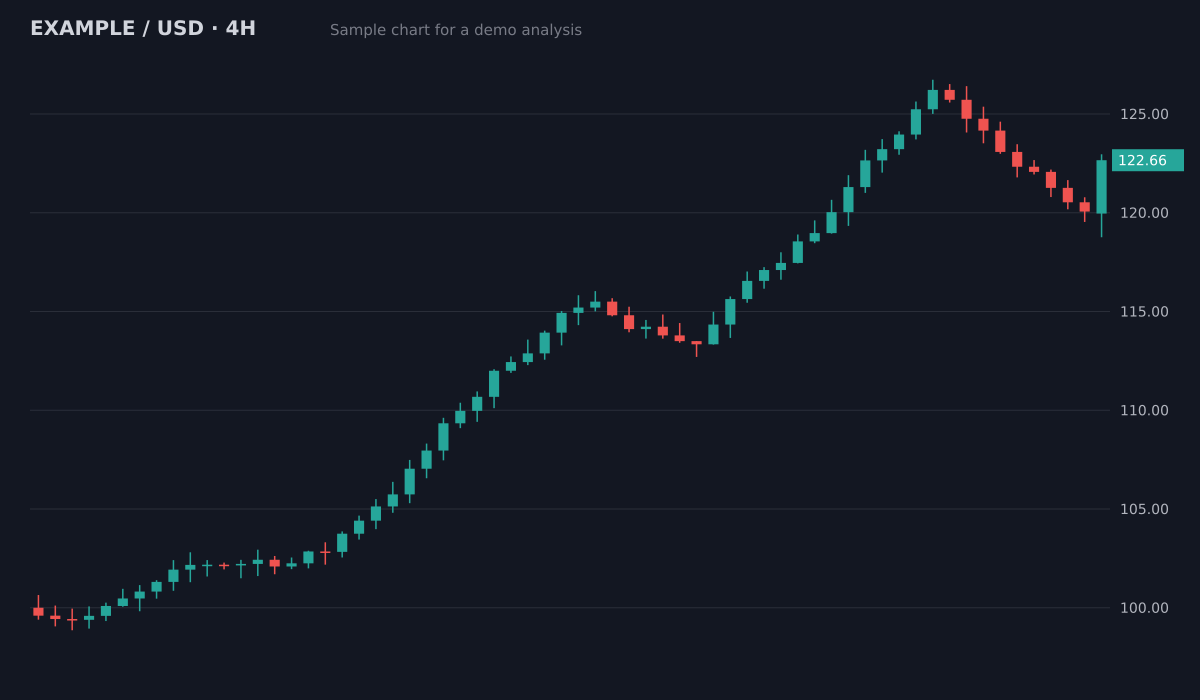
- Bias
- Bullish, pullback in an uptrend
- Structure
- Higher highs and higher lows since 100; pullback held above the 119.5 breakout area
- Key levels
- Resistance126.5 (swing high)
- Support119.5 to 120 (old breakout)
- Support113.5 to 115 (prior range)
- Plan
- Entry zone120.5 to 121.5
- Stop loss118.4
- Target 1126.5 (1:2.1)
- Target 2129.5 (1:3.3)
Invalid if a 4H candle closes below the 119.5 support. Size the position from the stop distance.
Sample chart with illustrative prices, not a live market. Educational, not financial advice.
Try it on your own chartTest it on a chart you already know
Take an old chart, crop off what happened next, and upload it. You learn more from one honest test than from any marketing page, including this one.
Check the plan is complete
A useful answer has a bias, an entry zone, a stop or invalidation level, targets and a risk to reward. A paragraph of description without levels is not a plan.
Check what it admits it cannot do
A chart does not show the news, the spread or your account size. A good tool says so instead of sounding certain.
Try it on your chart now
No account needed. Upload a screenshot and see the bias and key levels in seconds.
1. It tells you where the idea is wrong
The most useful number in any plan is the invalidation level: where the setup no longer makes sense. A tool that only gives targets leaves out the part that protects your account.
2. The prices match your chart
Compare the levels it gives with the price axis on your screenshot. If a support level or entry is far from anything visible on the chart, the read is not reliable.
3. No win rates or profit promises
Be careful with any tool that quotes accuracy percentages or promises profits. Results depend on the market, the timeframe and how you trade. Treat the output as a second opinion, not a signal to copy.
4. Clear about your data
Check what happens to the image you upload and whether it asks for broker logins or API keys. A screenshot analyzer should need only the picture. ChartEdge AI never asks for broker access, and the privacy policy says what is kept.
5. You can try it before you pay
A free trial on your own charts, without a card, is the fairest test. ChartEdge AI gives 3 free analyses, then costs $20 a month, cancel anytime.
6. The same structure every time
When every answer has the same parts (trend, levels, entry, stop, targets, ratio), you can compare charts and review decisions later in a journal. Free-form answers are hard to check.
Learn and plan for free
- Guide: How to Read a Trading Chart for Beginners
- Guide: How to Read Candlestick Patterns From a Chart Screenshot
- Guide: Support and Resistance for Beginners
- Guide: How to Set a Stop Loss
- Free position size calculator
- Free risk reward calculator
- Free pip value calculator
- AI chart analysis tools 2026: prices and free plans
Questions
Is ChatGPT good enough for chart analysis?
A general chatbot can describe a chart, but answers change with the prompt and often lack levels or an invalidation point. Our ChatGPT comparison page shows the differences. Try both on the same chart and compare.
Which is the best AI chart analysis tool?
It depends on what you need. If you want a screenshot turned into a structured plan with entry, stop and targets, ChartEdge AI is built for that. Run the checks on this page with any tool you consider.
Can an AI tool predict the market?
No. It can read structure, levels and patterns faster than you, but it cannot see the future or the news. Educational analysis, not financial advice.
Can I test ChartEdge AI without an account?
Yes. The demo on this page reads a chart without signing up. A free account adds 3 full analyses with entry, stop and targets, no card required.
Try it on your next chart
Upload a screenshot and get a full trade plan in seconds.
3 free analyses. No card required.
Run the 6 checks on your own chart
Try free