ChatGPT vs a dedicated AI chart tool
General chatbots like ChatGPT can read a chart image and talk about it. ChartEdge AI does one job: turn a chart screenshot into a structured trade plan. Here is where each one fits, without the hype.
What you get from one screenshot
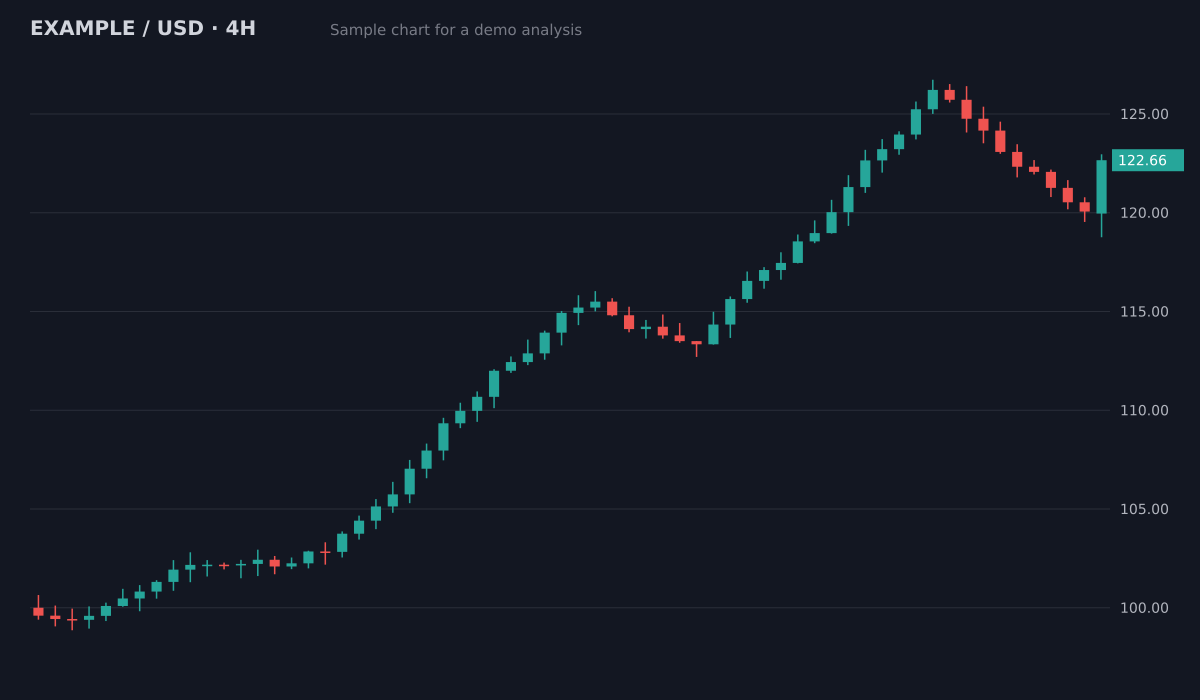
- Bias
- Bullish, pullback in an uptrend
- Structure
- Higher highs and higher lows since 100; pullback held above the 119.5 breakout area
- Key levels
- Resistance126.5 (swing high)
- Support119.5 to 120 (old breakout)
- Support113.5 to 115 (prior range)
- Plan
- Entry zone120.5 to 121.5
- Stop loss118.4
- Target 1126.5 (1:2.1)
- Target 2129.5 (1:3.3)
Invalid if a 4H candle closes below the 119.5 support. Size the position from the stop distance.
Sample chart with illustrative prices, not a live market. Educational, not financial advice.
Try it on your own chartWith ChatGPT
Upload the image, write a prompt, read a free-form answer. The quality and format depend on how you ask, and you rewrite the prompt every time.
With ChartEdge AI
Upload the image. You get the same structure every time: bias, pattern, entry, stop loss, take profit levels, risk to reward and the reasoning.
What carries over
ChartEdge AI keeps every analysis in your dashboard, links them to journal notes, and pre-fills the position sizer from the plan.
Try it on your chart now
No account needed. Upload a screenshot and see the bias and key levels in seconds.
Where ChatGPT is the better choice
If you already pay for ChatGPT and want to discuss a chart, ask follow-up questions or learn a concept, a general chatbot is flexible and you need nothing extra. It also handles things unrelated to charts.
Where a dedicated tool helps
A fixed output format makes plans comparable from one chart to the next. Every plan includes a stop loss and an invalidation level, so you are never left with an opinion and no exit. Your history, journal and position sizing live in one place.
Price
ChartEdge AI gives 3 free analyses without a card, then costs $20 per month or $180 per year. ChatGPT has its own free and paid plans. Try both on the same chart and keep the one whose output you actually use.
Questions
Can ChatGPT read a trading chart screenshot?
Yes, models with image input can describe a chart and suggest levels. How useful the answer is depends on your prompt and on how clearly the chart shows prices and the timeframe.
Is ChartEdge AI built on top of a general model?
ChartEdge AI uses OpenAI vision models with its own instructions, checks and fixed plan format, plus the dashboard, journal and position sizer around them.
Is either one financial advice?
No. Both give educational analysis. Always check the plan against your own view and manage risk.
Try it on your next chart
Upload a screenshot and get a full trade plan in seconds.
3 free analyses. No card required.
Analyse your own chart in seconds
Try free