TradingView Ideas vs analysing your own chart
TradingView Ideas are charts and opinions published by other traders. ChartEdge AI reads the chart you are actually trading, with your timeframe and your indicators, and writes a plan for it. They answer different questions.
What you get from one screenshot
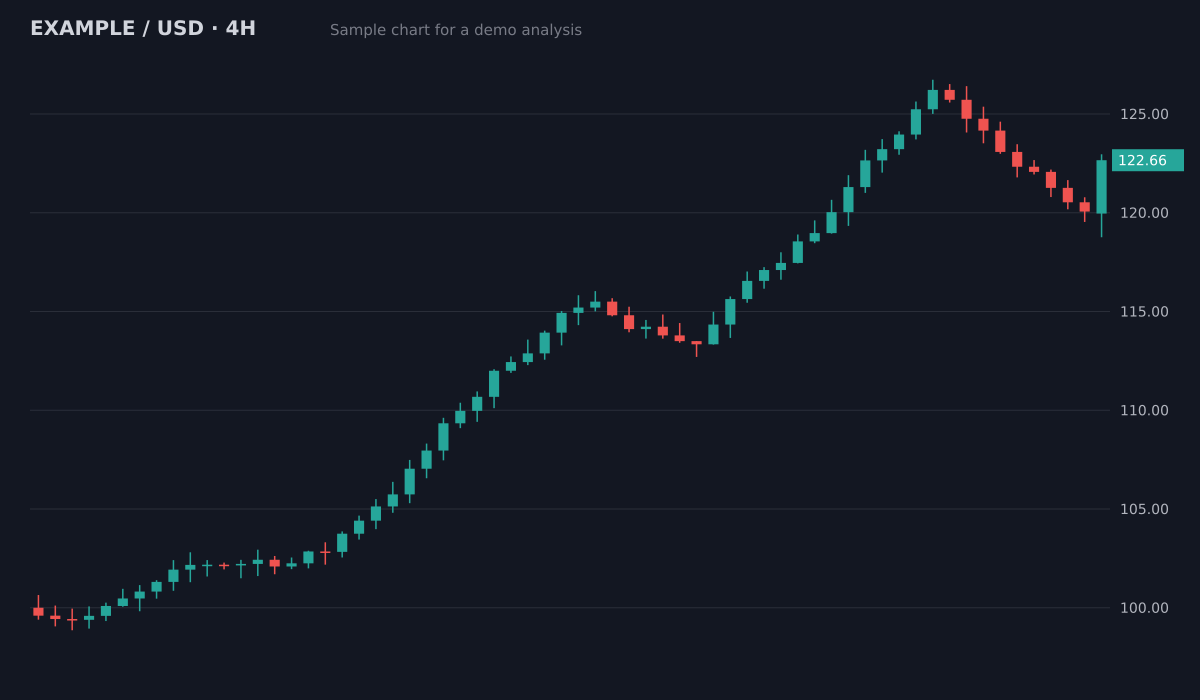
- Bias
- Bullish, pullback in an uptrend
- Structure
- Higher highs and higher lows since 100; pullback held above the 119.5 breakout area
- Key levels
- Resistance126.5 (swing high)
- Support119.5 to 120 (old breakout)
- Support113.5 to 115 (prior range)
- Plan
- Entry zone120.5 to 121.5
- Stop loss118.4
- Target 1126.5 (1:2.1)
- Target 2129.5 (1:3.3)
Invalid if a 4H candle closes below the 119.5 support. Size the position from the stop distance.
Sample chart with illustrative prices, not a live market. Educational, not financial advice.
Try it on your own chartTradingView Ideas
Browse published ideas for a symbol. Each one reflects its author's timeframe, method and timing, and may be days old by the time you read it.
ChartEdge AI
Screenshot the chart in front of you and upload it. The analysis is about that chart, at that moment, on your timeframe.
Use them together
Read ideas for perspective, then check your own chart and plan with ChartEdge AI before you decide anything.
Try it on your chart now
No account needed. Upload a screenshot and see the bias and key levels in seconds.
What Ideas are good for
Ideas are free and show how other traders see a market: levels they watch, patterns they spot, arguments for and against. They are a good way to learn methods and find levels you missed.
Where they fall short for a decision
An idea is someone else's trade on someone else's timeframe, often without a stop loss you can use. Quality varies widely and there is no consistent format to compare one idea with another.
What ChartEdge AI adds
A consistent plan for your chart: bias, setup, entry zone, stop loss, targets and risk to reward, saved in your history with journal notes and a position sizer. It costs $20 per month after 3 free analyses.
Learn and plan for free
- Guide: How to Read a Trading Chart for Beginners
- Guide: How to Read Candlestick Patterns From a Chart Screenshot
- Guide: Support and Resistance for Beginners
- Guide: How to Set a Stop Loss
- Free position size calculator
- Free risk reward calculator
- Free pip value calculator
- AI chart analysis tools 2026: prices and free plans
Questions
Does ChartEdge AI work with TradingView charts?
Yes. Use the TradingView snapshot button or any screenshot tool and upload the image. No account connection is needed.
Are TradingView Ideas free?
Yes, browsing published ideas on TradingView is free. ChartEdge AI is a separate paid tool with 3 free analyses to start.
Should I copy trades from Ideas or from an AI?
Neither. Use both as input, decide with your own rules and always set a stop loss. Nothing here is financial advice.
Try it on your next chart
Upload a screenshot and get a full trade plan in seconds.
3 free analyses. No card required.
Analyse your own chart in seconds
Try free