AI analysis for your MT4 and MT5 charts
Take a screenshot of your MetaTrader 4 or MetaTrader 5 chart, upload it, and get a structured read of the trend, the key levels and a complete trade plan with entry, stop loss and targets. No expert advisor to install and no account to connect.
What you get from one screenshot
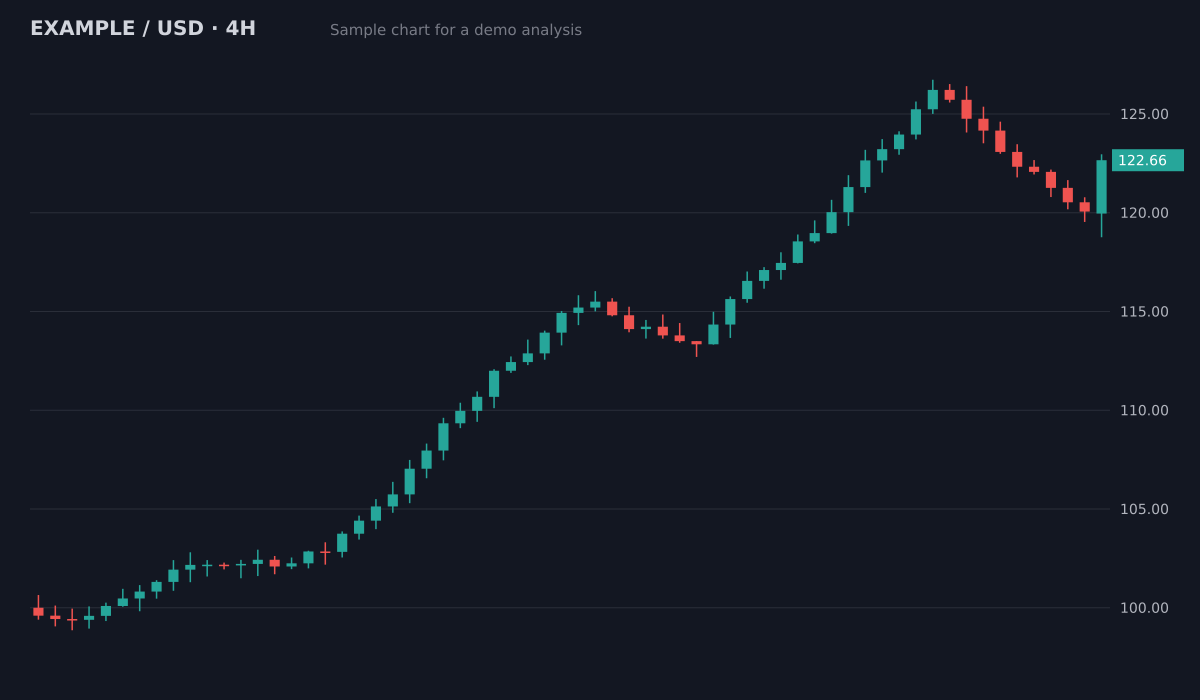
- Bias
- Bullish, pullback in an uptrend
- Structure
- Higher highs and higher lows since 100; pullback held above the 119.5 breakout area
- Key levels
- Resistance126.5 (swing high)
- Support119.5 to 120 (old breakout)
- Support113.5 to 115 (prior range)
- Plan
- Entry zone120.5 to 121.5
- Stop loss118.4
- Target 1126.5 (1:2.1)
- Target 2129.5 (1:3.3)
Invalid if a 4H candle closes below the 119.5 support. Size the position from the stop distance.
Sample chart with illustrative prices, not a live market. Educational, not financial advice.
Try it on your own chartScreenshot the MT4 or MT5 chart
On desktop use any screenshot tool, or File > Save as Picture. On the MetaTrader phone app, a normal phone screenshot works. Keep the price scale and the symbol visible.
Upload it
Drop the image into ChartEdge AI from your computer or phone. Nothing to install in MetaTrader.
Get the plan
Bias, setup, entry zone, stop loss, take profit levels and risk to reward, written in plain language.
Try it on your chart now
No account needed. Upload a screenshot and see the bias and key levels in seconds.
Nothing to install in MetaTrader
ChartEdge AI only reads the picture. There is no expert advisor, no indicator file and no login to your broker or trading account, so it works with any MT4 or MT5 broker.
Reads what you have on the chart
Candles, moving averages, RSI, MACD, Bollinger Bands, trendlines and horizontal lines you drew are all taken into account. A clean chart with fewer indicators gives the clearest read.
From levels to lot size
Every plan gives an entry, a stop loss and targets. The free position size and pip value calculators then turn the stop distance into a lot size for your account and risk.
Questions
Does ChartEdge AI connect to my MetaTrader account?
No. It never asks for your broker login or investor password. It only needs a screenshot of the chart.
Does it work with the MetaTrader phone app?
Yes. Take a normal screenshot in the MT4 or MT5 app, turn the phone sideways for a wider chart if you can, and upload it from your phone browser.
Which markets work?
Anything your MetaTrader broker offers: forex pairs, gold, indices, oil and crypto CFDs. Keep the symbol and timeframe visible on the screenshot.
Is there a free trial?
Yes. Your first 3 analyses are free with no card required. Then it is $20 per month. Educational analysis, not financial advice.
Try it on your next chart
Upload a screenshot and get a full trade plan in seconds.
3 free analyses. No card required.
Get a plan for your MT4 or MT5 chart
Try free